How to handle GST RFD-01 refund rejections and tax queries
A complete walkthrough on how to reply to tax officer show-cause notices for zero-rated export refunds.
Navigating GST Refund rejections
Exporters claiming refunds on accumulated input tax credits via Form RFD-01 often receive queries or rejection notices from tax officers. These queries are typically sent under Form GST RFD-08, citing mismatch errors between your invoices and bank FIRC realization dates.
Best Practices for responses
- Draft a structured reply in Form RFD-09 explaining all transaction dates.
- Attach a reconciliation sheet mapping your GSTR-1 entries to banking e-FIRA reports.
- Ensure that your bank purposed code matches the services billed (e.g. software consultancy P0802).
Verify that your invoices are aligned using FiscLane's Cross-Document auditor console before submitting refund requests.
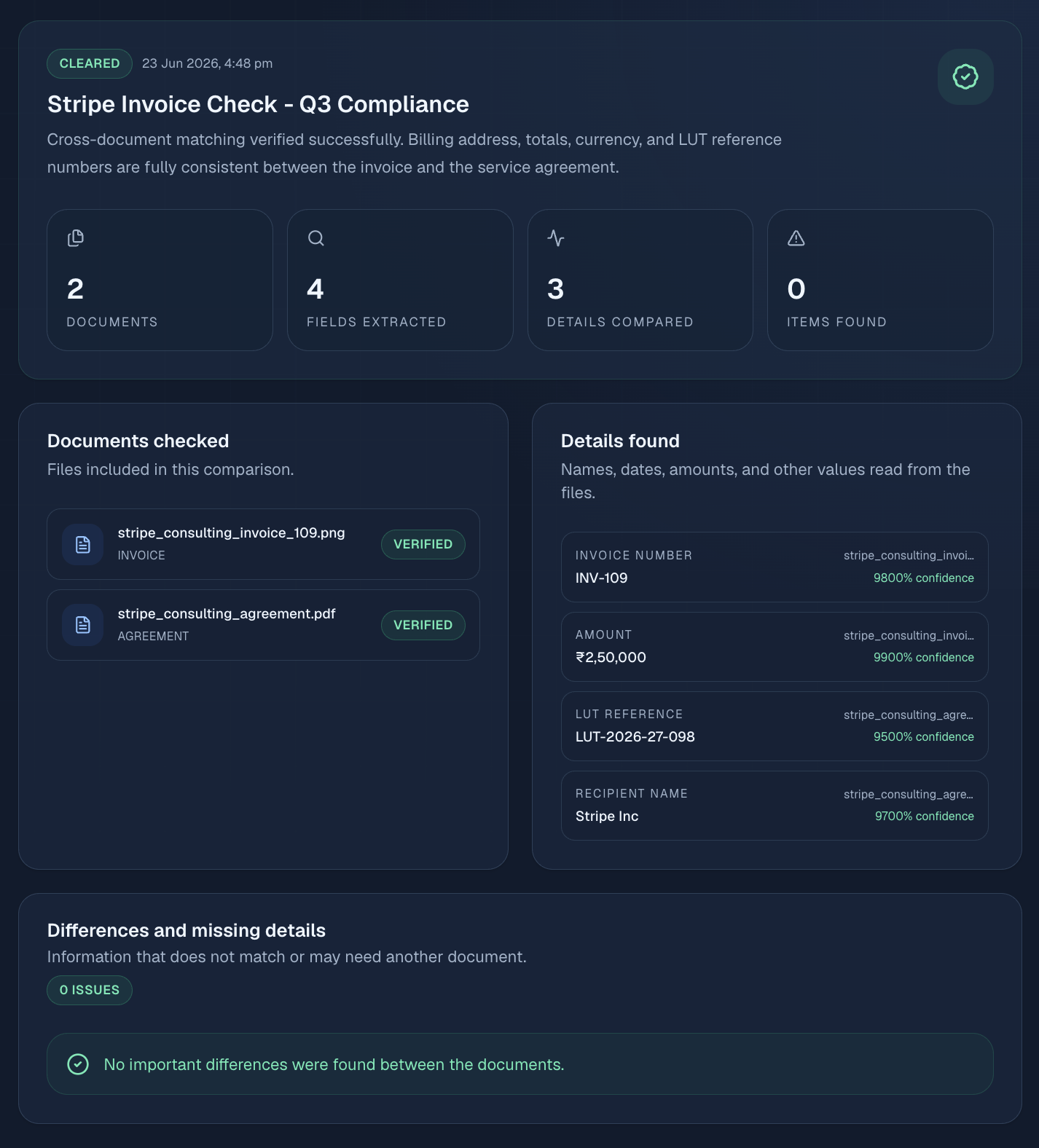
Submit the reply promptly to prevent the department from rejecting the refund request.
Ensure that all export payments have matching bank FIRC codes before filing, as any mismatch will trigger an officer review.
Statutory Compliance & GST Export Framework
Under Section 16 of the Integrated Goods and Services Tax (IGST) Act, 2017, export transactions are categorized as Zero-Rated Supplies. This legal position allows exporters to conduct business operations without tax liability. However, to maintain this tax-exempt status, businesses must adhere strictly to the rules laid down in Rule 96A of the CGST Rules, 2017. Under this rule, you must either export under a Letter of Undertaking (LUT) in Form GST RFD-11 or pay the applicable integrated tax (IGST) upfront and later claim a refund of the paid tax. Read more on filing and invoicing in our LUT Witness & Invoice Setup Guide.
Filing the Letter of Undertaking (LUT) is a mandatory step that must be completed prior to the commencement of export operations for each financial year. Exporters often make the mistake of issuing invoices with zero tax before filing the LUT. This omission is flagged during tax audits, resulting in demand notices from the department. The LUT is valid only for a single financial year (from April 1 to March 31), and a fresh application must be submitted online on the official GST Portal (gst.gov.in) at the start of every new fiscal period to prevent compliance disruptions.
Additionally, the place of supply for cross-border services must be determined in accordance with Section 13 of the IGST Act. In most cases involving remote consultancy, software development, and digital marketing, the Place of Supply is the location of the recipient outside India. However, if the services are classified as intermediary services (where the exporter merely facilitates a supply between two parties), the Place of Supply shifts to India, making the transaction subject to 18% IGST. Understanding this distinction is vital for digital agencies to avoid audit assessments, as discussed in our analysis of the GST Place of Supply rules.
Step-by-Step GST Portal Navigation for RFD-11
To file the Letter of Undertaking on the GST portal, follow this precise navigation pathway:
- Log into the GST Portal using your registered tax credentials.
- Navigate to the top menu and select Services > User Services > File LUT (RFD-11).
- Select the correct Financial Year for which you are submitting the LUT from the drop-down menu.
- If you have previously filed an LUT for the prior financial year, upload the previous LUT ARN receipt as supporting evidence.
- Fill in the declaration check-boxes confirming that you will realize export proceeds within the mandated timeline.
- Enter the details (Name, Address, PAN, and signatures) of two independent witnesses. Ensure their details match their official tax records. You can download the template from our LUT Witness affidavit guide.
- Sign the application using your Digital Signature Certificate (DSC) or through Electronic Verification Code (EVC) OTP, then click submit.
Once submitted, the portal will generate an Application Reference Number (ARN) receipt. You must print this ARN number on all your commercial export invoices to satisfy customs and bank compliance officers during audits.
DTAA & Withholding Tax Exemption Framework
Double Taxation Avoidance Agreements (DTAA) are bilateral treaties signed between India and other countries (such as the US, UK, and Germany) to prevent taxpayers from being taxed twice on the same income. When Indian freelancers or agencies bill international clients, the foreign tax department typically requires the client to deduct Withholding Tax (WHT) of up to 30% from the payment. However, under DTAA rules, these rates can be reduced to 0% for independent services, provided you submit the necessary tax documentation. Refer to our DTAA No-PE Declaration Guide.
The most critical document required to claim DTAA benefits is the Tax Residency Certificate (TRC), which is issued by the Indian Income Tax Department. The TRC proves that you are a tax resident of India and are subject to Indian tax codes. Alongside the TRC, foreign clients will request a signed No Permanent Establishment (No-PE) Declaration. This declaration confirms that your business does not have a physical office, branch, or dependent agent in the client's country, exempting your professional profits from local taxes.
For US clients, Indian individuals must submit Form W-8BEN, while corporate entities must complete Form W-8BEN-E on the US IRS website (irs.gov). These forms contain treaty claims referencing specific articles (such as Article 15 for independent personal services). Filing these forms correctly ensures that you receive your export payments in full, avoiding complex tax recovery procedures.
TRC Application Procedure (Form 10FA and 10FB)
To obtain a Tax Residency Certificate (TRC) from the Indian Income Tax Department, follow this procedure:
- Log into the official Income Tax e-filing portal (incometax.gov.in) using your PAN credentials.
- Navigate to e-File > Income Tax Forms > File Income Tax Forms.
- Select Form 10FA (Application for Tax Residency Certificate) for the relevant assessment year.
- Fill in your business details, address, and the specific countries for which you require the DTAA treaty benefits.
- Submit the application online. The Assessing Officer (AO) will review the application and issue the TRC in Form 10FB.
- Download the issued TRC and provide it to your overseas clients along with the signed No-PE declaration sheet. Read our Form 10F online filing guide for portal details.
Frequently Asked Questions (FAQs)
1. What is the penalty for not filing an LUT before service exports?
If you export services without an active LUT, the transaction is treated as a domestic inter-state supply, making it subject to 18% IGST. You must pay this tax out-of-pocket and then apply for a refund using Form RFD-01. Delayed payments will also attract interest charges at 18% per annum under Section 50 of the CGST Act. Refer to the GST portal guidelines.
2. Can I receive export proceeds in Indian Rupees (INR)?
Under FEMA guidelines, export proceeds must generally be received in convertible foreign exchange (such as USD, EUR, or GBP). However, payments in INR are permitted if they are routed through Vostro accounts of foreign banks or are received from specific countries as notified by the Reserve Bank of India (RBI). Verify details on the official RBI Website (rbi.org.in).
3. Is a Tax Residency Certificate (TRC) mandatory for DTAA claims?
Yes, Section 90(4) of the Income Tax Act states that a taxpayer cannot claim DTAA benefits unless they obtain a valid Tax Residency Certificate (TRC) from their home country's tax authority. Foreign clients will deduct the default 30% withholding tax if the TRC is missing. Read our Form 10F online filing guide.
4. Can I claim Input Tax Credit on RCM payments immediately?
Yes, you can claim the Input Tax Credit (ITC) for RCM payments in the same monthly return cycle in which the liability is declared and settled, provided the service is used for business operations and is not blocked under Section 17(5). Read the Startup RCM Checklist for full reconciliation checks.
CA Amit Sharma
Verified Advisory LeadAmit is a Chartered Accountant (ICAI membership #409214) and FEMA compliance advisor with over 8 years of experience advising technology startups, digital marketing agencies, and remote professionals on zero-rated GST exports, DTAA declarations, and RBI inward remittance audits.
Disclaimer: The information provided above is for educational purposes only and does not constitute formal legal or financial advice. Please verify details using official circulars issued by the Central Board of Indirect Taxes & Customs (CBIC) and RBI.